前回 の続きです。
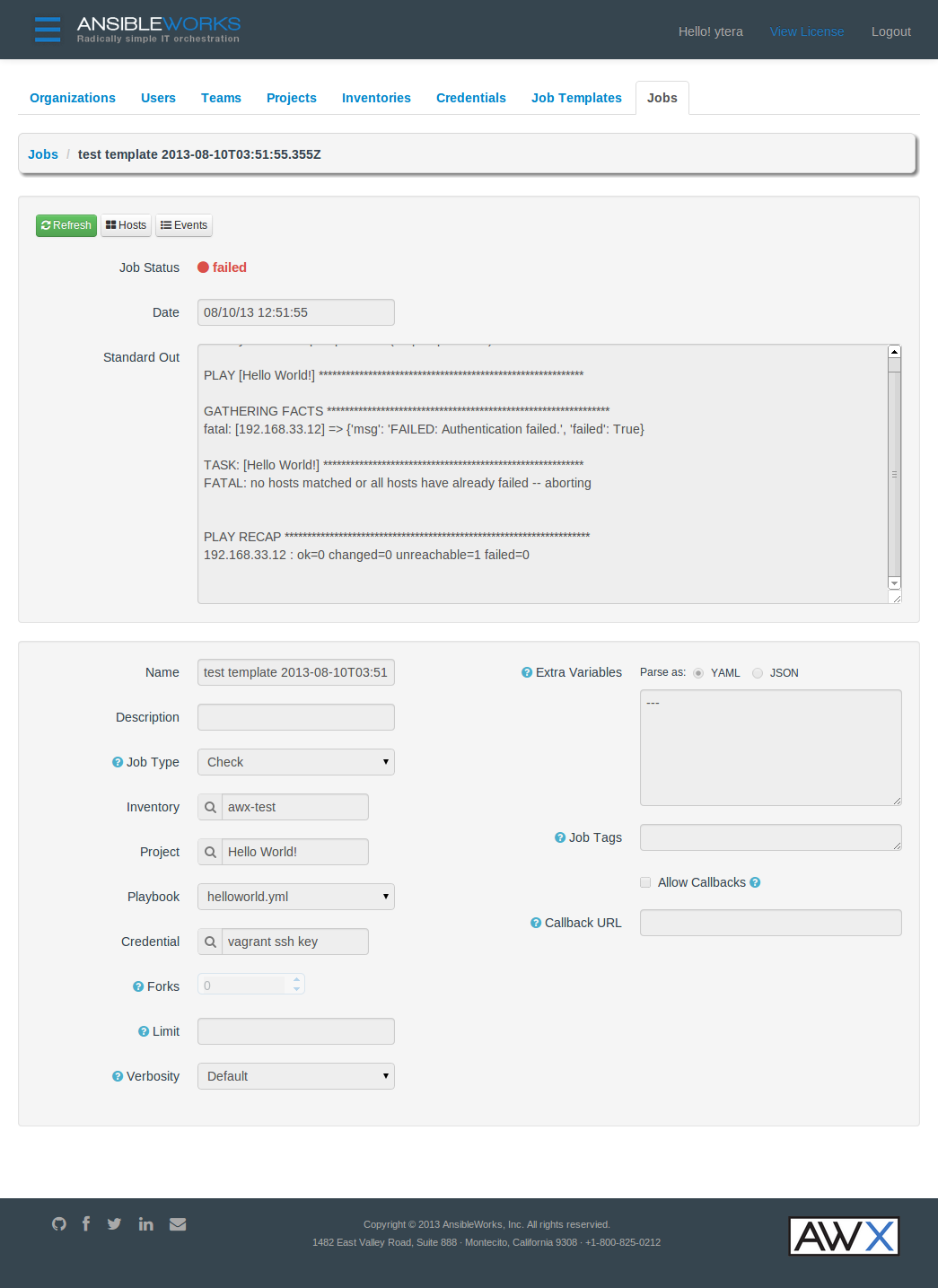
AnsibleWorks AWX User Guide では projects/helloworld/helloworld.yml というテスト用の Playbook が載っているのですが、この内容が次のようになっており user: root が指定してあるため Credentials の SSH Username が helloworld.yml で上書きされて Authentication failed となるという現象で少しハマりました。
1
2
3
4
5
6
7
---
- name : Hello World!
hosts : all
user : root
tasks :
- name : Hello World!
shell : echo "Hi! AWX is working"
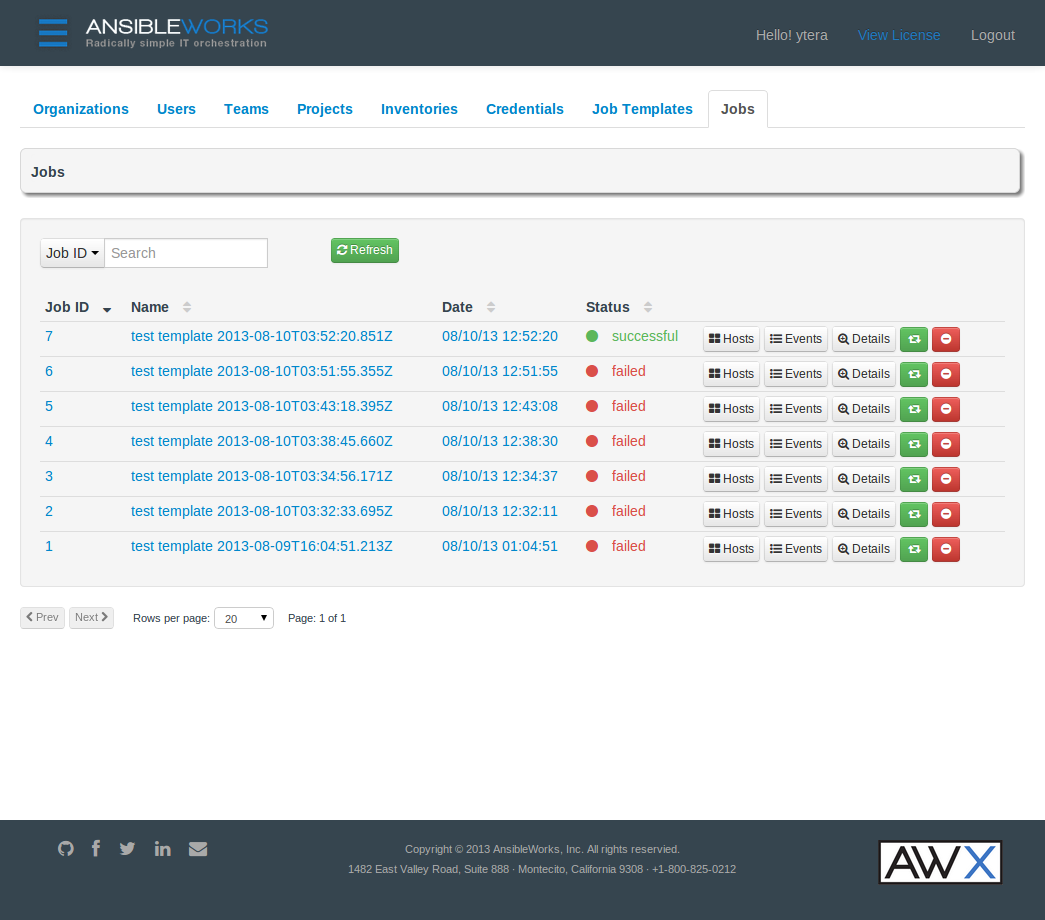
AWX の良い所は実行のログがずっと残って簡単に参照や再実行ができるところですね。Playbook の作成自体は手動です。ユーザーや権限管理ができるので権限分離の上でぽちぽちボタンをクリックするだけでアプリのデプロイができたりするのは便利なのかもしれない。
job の実行履歴
失敗した job の詳細画面
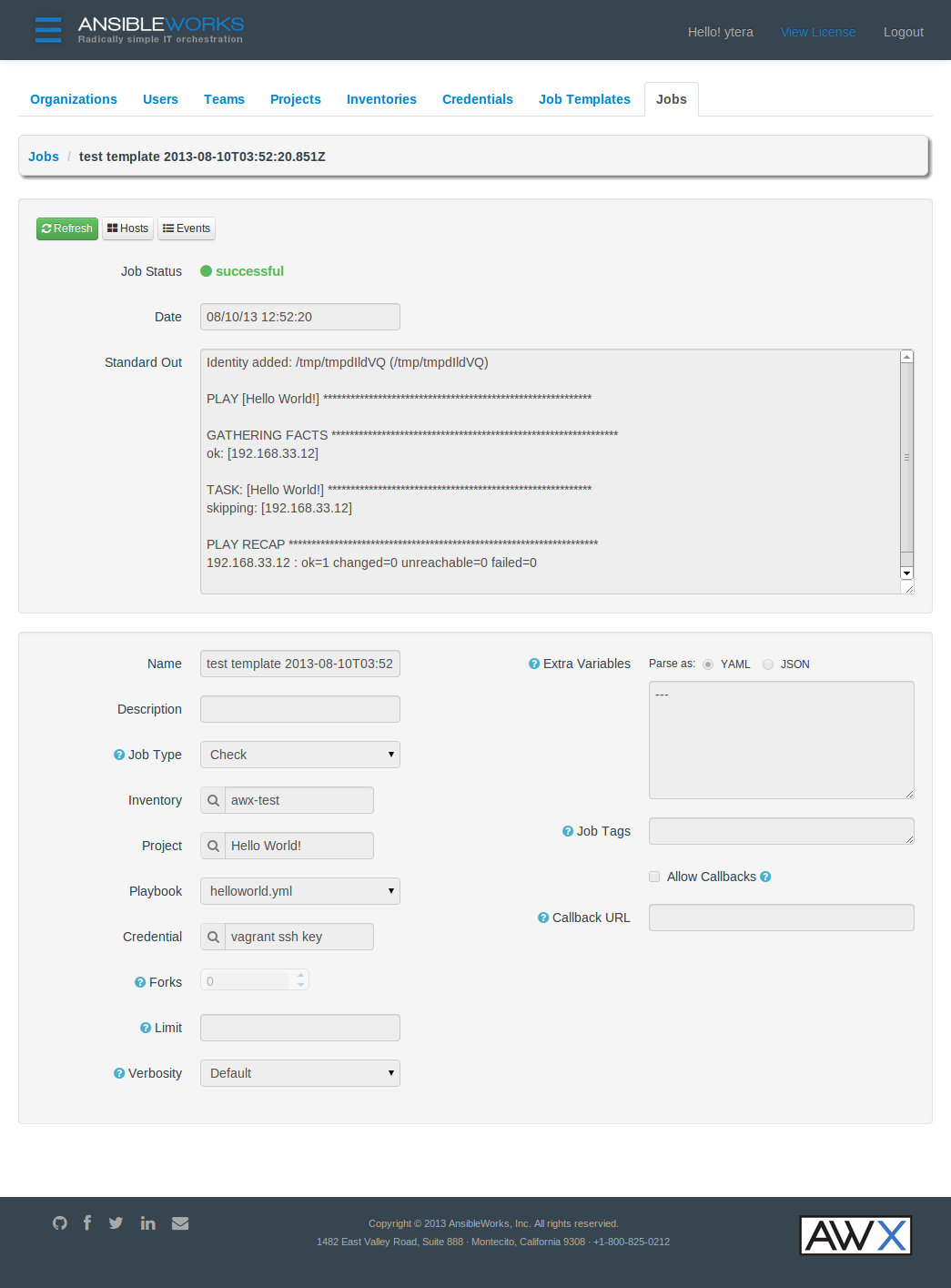
成功した job の詳細画面
さて、前回 AWX のインストーラーが Playbook でできているから参考になりそうなので読んでみようと書きました。さっそく確認してみます。 まずはインベントリファイルの myhosts と、メインの site.yml です。
1
2
3
4
5
6
7
8
9
10
11
12
13
14
15
16
17
18
19
20
21
22
23
24
25
26
27
28
29
30
31
32
33
34
35
36
37
38
39
40
---
# This playbook deploys the AWX application (database, web and worker) to a
# single server.
- hosts : all
tasks :
- name : group hosts by distribution
group_by : key="{{ ansible_distribution }}-{{ ansible_distribution_version }}"
- hosts : RedHat-6*:CentOS-6*:SL-6*
user : root
roles :
- { role : packages_el6 }
- { role: postgres, pg_hba_location : "/var/lib/pgsql/data/pg_hba.conf" }
- { role : awx_install }
- { role: supervisor, sup_init_name : "supervisord" , sup_conf_location : "/etc/supervisord.conf" }
- { role: httpd, httpd_init_name : "httpd" }
- { role : iptables }
- { role : misc }
- hosts : Fedora-*
user : root
roles :
- { role : packages_fedora }
- { role: postgres, pg_hba_location : "/var/lib/pgsql/data/pg_hba.conf" }
- { role : awx_install }
- { role: supervisor, sup_init_name : "supervisord" , sup_conf_location : "/etc/supervisord.conf" }
- { role: httpd, httpd_init_name : "httpd" }
- { role : iptables }
- { role : misc }
- hosts : Ubuntu-12*:Ubuntu-13*
user : root
roles :
- { role : packages_ubuntu }
- { role: postgres, pg_hba_location : "/etc/postgresql/9.1/main/pg_hba.conf" }
- { role : awx_install }
- { role: supervisor, sup_init_name : "supervisor" , sup_conf_location : "/etc/supervisor/conf.d/awx.conf" }
- { role: httpd, httpd_init_name : "apache2" }
- { role : misc }
なるほどぉ。group_by でダイナミックにグルーピングを行い、Linux の distribution 毎の role へと振り分けることが可能なわけですね。 そして、roles を使って role を割り付ける際に変数を設定できるようです。Distribution 間での差がファイルの path だけとか、簡単なものについてはこうやって変数を使うことで role (task) をまとめられるんですね。 今回は CentOS 6 へインストールしたので以降は CentOS 用の role を見ていきます。
packages_el6
 1
 2
 3
 4
 5
 6
 7
 8
 9
10
11
12
13
14
15
16
17
18
19
20
21
22
23
- name : install EL6 awx yum repository
template : src=yum_repo.j2 dest=/etc/yum.repos.d/awx.repo
when : tarball is not defined
register : yum_repo
- name : yum clean cached awx repository information
command : yum clean all --disablerepo=* --enablerepo=ansibleworks-awx
when : tarball is not defined and yum_repo.changed
- name : install required packages for EL6
yum : name=$item state=installed
with_items :
- Django14
- httpd
- mod_wsgi
- libselinux-python
- policycoreutils-python
- postgresql-server
- python-psycopg2
- python-setuptools
- setools-libs-python
- supervisor
tags : packages
注目すべき点を含む task を抜粋しました。
"install EL6 awx yum repository" では when: tarball is not defined と register: yum_repo がポイントです。when では ansible-playbook の -e, --extra-vars で指定する EXTRA_VARS (key=value) で tarball という変数が指定されているかどうかでこの task を実行するかどうか判断しています。AWX のインストールでは setup.sh に -e オプションで渡した引数が ansible-playbook コマンドに渡されます。 register: yum_repo はこの task の結果情報を yum_repo という変数(Object?)に登録します。以降の task でこの情報を参照することができます。この機能の詳細は Advanced Playbooks (register variables) が参考になります。 次の "yum clean cached awx repository information" task の when で yum_repo の情報が参照されています。when: tarball is not defined and yum_repo.changed 先ほどの tarball 変数が未定義という条件に and で yum_repo.changed とあります。あの task で変更があった場合ということになります。yum_repo の task で変更の必要がなかった場合にはこの task も実行されないということになります。 そして、次の task には with_items と $item があります。with_items のリストの要素をループで $item 変数に入れて処理します。
postgres
 1
 2
 3
 4
 5
 6
 7
 8
 9
10
11
12
13
14
15
16
17
- name : init postgresql
command : service postgresql initdb creates=/var/lib/pgsql/data/PG_VERSION
when : ansible_distribution != "Ubuntu"
tags : postgresql
- name : update postgresql authentication settings
template : src=pg_hba.conf.j2 dest={{pg_hba_location}} owner=postgres
notify : restart postgresql
tags : postgresql
- name : restart postgresql and configure to startup automatically
service : name=postgresql state=restarted enabled=yes
tags : postgresql
- name : wait for postgresql restart
command : sleep 10
tags : postgresql
PostgreSQL 関連 task の抜粋です(次以降も抜粋です)。1つ目の task では when: ansible_distribution != "Ubuntu" という条件が指定されています。Ubuntu ではインストーラーが initdb を実行してくれるんでしょう(locale ってどう指定されてるんだろう?)。command で creates=/var/lib/pgsql/PG_VERSION が指定されているのでこのファイルが存在していればこの task (initdb) は実行されません。 次の task では template モジュールを使って pg_hba.conf を書き換えています。notify: restart postgresql により、pg_hba.conf が書き換えられたら PostgreSQL をリスタートします。この "restart postgresql" 処理は roles/postgres/handlers/main.yml で定義されています。でも pg_hba.conf の更新で restart って良くないな、reload で十分なのに。 最後の task は sleep です。PostgreSQL の起動には時間がかかるので 10 秒待っています。でもこれは pause モジュールを使う方が良いのかな? それとも中断の選択肢を与えないための command モジュールでの sleep なのかな?
awx_install
1
2
3
4
5
6
7
8
9
- name : configure awx user
user : name={{aw_user}} system=yes home={{aw_home}} shell=/bin/bash comment="AWX"
when : tarball is defined
tags : awx,user
- name : create django super user
shell : echo "from django.contrib.auth.models import User; User.objects.filter(username='{{admin_username}}').count() or User.objects.create_superuser('{{admin_username}}', '{{admin_email}}', '{{admin_password}}')" | awx-manage shell
sudo_user : awx
tags : awx
ここは特に特殊な使い方は無いですね。tags ってカンマ区切りで複数指定できるんですね。まあ tags って s がついてるくらいだから。 2つ目のは「Python ってワンライナー書けるんだ!?」と…
supervisor
 1
 2
 3
 4
 5
 6
 7
 8
 9
10
11
12
13
14
15
16
17
18
19
20
21
22
23
24
25
26
27
- name : update supervisor config
ini_file : dest={{sup_conf_location}} section="program:awx-celeryd" option="{{item.option}}" value="{{item.value}}"
with_items :
- option : command
value : "/usr/bin/awx-manage celeryd -B -l info --autoscale=20,2"
- option : directory
value : "{{ aw_home }}"
- option : user
value : "{{ aw_user }}"
- option : autostart
value : "true"
- option : autorestart
value : "true"
- option : stopwaitsecs
value : 600
- option : log_stdout
value : "true"
- option : log_stderr
value : "true"
- option : logfile
value : "/var/log/supervisor/awx-celeryd.log"
- option : logfile_maxbytes
value : 50MB
- option : logfile_backups
value : 999
notify : restart supervisor
tags : supervisor
へー、with_items って list の要素が hash っていうのもありなんですね。
httpd
 1
 2
 3
 4
 5
 6
 7
 8
 9
10
11
12
13
14
- name : determine if selinux is installed
shell : which getenforce || exit 0
register : selinux_installed
- name : determine if selinux is enabled
shell : getenforce | grep -q Disabled || echo yes && echo no
register : selinux_enabled
when : selinux_installed.stdout != ""
ignore_errors : true
- name : allow Apache network connections
seboolean : name=httpd_can_network_connect state=true persistent=yes
when : selinux_installed.stdout != "" and selinux_enabled.stdout == "yes"
tags : httpd
SELinux の有効・無効をチェックして必要な場合に seboolean モジュールで SELinux の設定を行なっています。register, when, ignore_errors が活用されています。
iptables
 1
 2
 3
 4
 5
 6
 7
 8
 9
10
- name : determine if iptables is installed
command : iptables --version
register : iptables_installed
ignore_errors : True
- name : insert iptables rule for httpd
lineinfile : dest=/etc/sysconfig/iptables state=present regexp="^.*INPUT.*tcp.*$httpd_port.*ACCEPT" insertafter="^:OUTPUT " line="-A INPUT -p tcp --dport {{httpd_port}} -j ACCEPT"
when : iptables_installed.rc == 0
notify : restart iptables
tags : iptables httpd
iptables の設定はできれば restart なしで行えれば良いのですが、やっぱりちょっと難しいですかね。
misc
1
2
3
4
5
6
- name : deploy config file for rsyslogd
copy : src=51-awx.conf dest=/etc/rsyslog.d/51-awx.conf
notify : restart rsyslogd
tags :
- misc
- rsyslog
おや?tags が今度はカンマ区切りじゃなくて list になってますね。こうも書けるようです。
以上、インストーラーの Playbook を調査してみました。
Ansible を使ったインストーラーも悪くないですね。
Ansible については Ansible Tutorial , Ansible in detail もよろしく〜。


 amazon.co.jp